Automation Blueprints (n8n Logic)
The system's "Surveillance" and "Human-in-the-Loop" capabilities are powered by n8n. This document breaks down the logic inside the n8n_workflows/Refined_Alert_System.json blueprint.
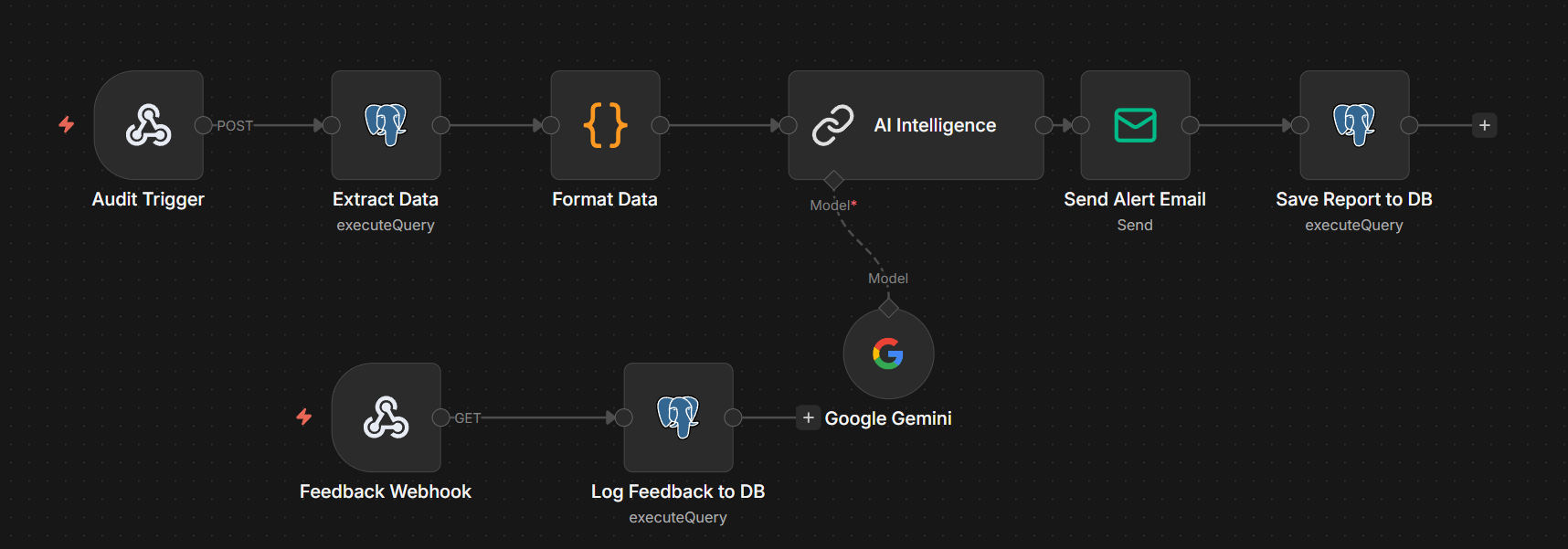
High-Level Logic Flow
The workflow is divided into two main execution paths:
- The AI Risk Audit: Pulls data → Asks Gemini → Sends Email → Saves Report.
- The Feedback Handler: Receives Link Click → Writes Confirmation to DB.
Path 1: The AI Risk Audit (Trigger-Based)
1. Audit Trigger (Webhook)
- Role: Listens for a POST request from the Streamlit "Run AI Audit" button.
- Production URL:
http://localhost:5678/webhook/audit-trigger
2. Postgres Data Pull
- Query: Selects the top 10 states from
v_critical_alertsfor the latest date. - Why: By using a SQL View, we keep the n8n logic simple. If we want to change the "definition" of a crisis, we update the SQL View, not the n8n node.
3. Gemini AI Analysis (The Intelligence)
- Model:
gemini3.0-flashor any other as required is available. - Role: Converts the raw JSON numbers into a structured HTML situation report.
- Key Instruction: Forces the model to return raw HTML with inline CSS, ensuring the report looks perfect in both Gmail and the Streamlit Portal.
4. Save & Send (Dual Destination)
- Email Node: Dispatches the briefing to the Chief Medical Officer.
- Postgres Write Node: Saves the HTML string into the
latest_ai_reporttable so the Streamlit app can display it.
Path 2: The Feedback Loop (Human-in-the-Loop)
This is what makes the system "Smart" over time.
1. Feedback Webhook
- URL:
http://localhost:5678/webhook/covid-feedback - Mechanism: The AI inserts two links in the email:
...status=Confirmed...status=False Positive
2. Logging the Truth
When a stakeholder clicks a link, n8n extracts the status, state, and date from the URL parameters and inserts them into the alert_feedback table.
Credential Management
To run this blueprint, you must configure two credentials in n8n:
-
Postgres Credentials:
- Host:
db(internal Docker name) - Database:
postgres - User:
postgres - Password:
password123
- Host:
-
Google Gemini Credentials:
- Requires a Google AI API Key from the Google AI Studio.
Troubleshooting the "Audit"
If the audit fails to generate a report:
- Check the Postgres Node: Ensure the app container has finished running the ETL (Gold layer must exist).
- Check Gemini Quotas: Ensure your API key is active and hasn't hit its free-tier rate limit.
- Inspect n8n Executions: Use the "Executions" tab in n8n to see exactly which node failed and read the error message.